It takes a long time to read long PDFS (especially if they’re full of research results, business reports, technical descriptions, and the like). Rather than just going through each page, AI summarisation can help you quickly see if you’re looking at the right thing.
After picking an AI PDF summarizer tool, you’ll then have to choose whether you want to use an online AI model or whether you’d prefer to run a large language model (LLM) locally on your Windows machine.
There are advantages to both approaches in terms of convenience, configuration, hardware, and data privacy. iBoomto brings all of these together in a Windows document-centric application.
Introducing iBoomto: Document AI for Windows
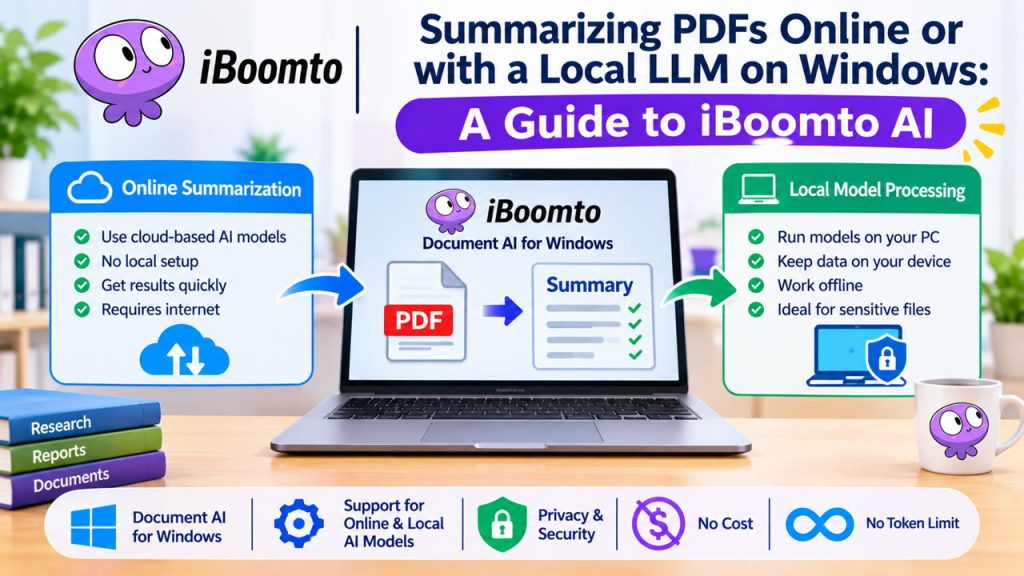
iBoomto is a Document AI solution for Windows that makes document processing easy for all. One of the useful features is the ability to support both a local and an online AI model. You can therefore choose to have the processing done via the cloud for ease of use, or go the other way and process your documents on your own PC using a local model.
It’s relevant for anyone writing research papers, business reports, personal reports, etc as it’s all about privacy and security. There’s no token limit, and it’s free to use, so it’s a very accessible form of AI-powered documentation without the need to pay for a subscription.
Of course, the Windows app will work with the cloud models too. Choosing the desktop app doesn’t in any way preclude you from using cloud-based models.
Online PDF Summarization: Convenience Without Complex Setup
Summarisation on the web is normally the easier of the two. You simply upload your PDF via an online service, and the selected cloud-based AI model does the work on the data over there.
This can be useful if you just want to produce a summary without the need to set up a local model. Most of the AI processing happens on the remote servers, so you don’t need your machine to be particularly powerful.
You do need an internet connection, though. Users should, of course, read the service’s privacy and retention policies before sending any confidential information, as the content of the documents will also be sent to the service for processing.
Summarisation is useful when the source material is a public research paper, a report or indeed a fairly standard reference type document.
Local LLM Processing: More Control Over Your Documents
Local AI models are different in that the AI processing is carried out on your Windows machine rather than having the document content sent off to a remote AI model.
This can be useful when you’re working with internal reports, private research, etc that you’re not going to be sharing and which therefore must remain on the device.
The primary issue is hardware. Local models make use of the memory and processing power of your computer. The bigger the model, the more RAM, storage, and/or a powerful GPU you’re likely to need.
Setting up can also be more of a challenge than with an online model. With the appropriate setup, though, local processing can offer a greater degree of independence from Internet connectivity.
One thing to bear in mind is that not all the features of an app are going to be offline for local model processing. You need to check what services are actually being used by the particular workflow.
How to Choose the Right Summarization Method
The choice will be down to the documents you’re working with and the resources you have to hand.
Online models are great for public PDFs and quick summaries and don’t require quite so much in the way of hardware prep.
If the data you’ve extracted must be kept on your own computer, then a local model may be the better option for internal use. Always check what the app actually does with your data.
With document work, iBoomto gives you the option of using different processing methods depending on the task. You’re not locked into one approach.
Final Thoughts
The problems with online and offline AI summarisation are the same, just different in the experience. The benefits of the cloud models are convenience and access; the local LLMs have the benefit of having control over the processing, and of course you don’t have to send any of the document content out of the organisation.
iBoomto’s AI Document agent environment in Windows has both capabilities. It’s definitely worth a look for all your everyday document needs, as it supports both online and local models, has a strong focus on privacy and security, is a no-cost approach, and has no token limit.
In the end, it’s down to your own equipment, your network infrastructure, the sensitivity of your documents, and your own preferences. Knowing the differences can go a long way to helping you make the right decision about how you summarise your PDFS.